
Recommended Mobile Friendly Casinos
As a mobile-first platform, we designed Instaspin Casino Online to be a strong choice for players who prefer gaming on the move. Our system runs fluidly on modern mobile devices, and our web-based app delivers the complete casino suite directly to your browser, with fast loading times, intuitive navigation, and secure access to your account. You can deposit, play, and withdraw funds with confidence from your mobile device. If you want to compare us with other mobile-friendly options, see how our Sister Sites stack up below.











How to Install the Instaspin App
Our app doesn’t require downloading from an app store. Instead, you add a shortcut for our progressive web app directly to your device’s home screen, giving you one-tap access like a traditional app, without using significant storage space.
- Open website
Navigate to Instaspin using your preferred mobile browser
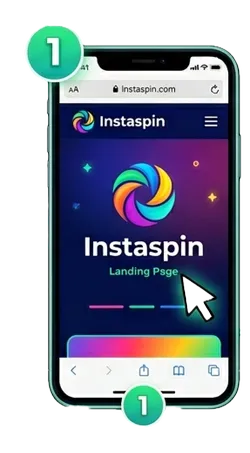
- Open your browser
Open your browser’s menu and look for the “Add to Home Screen” or a similar option.
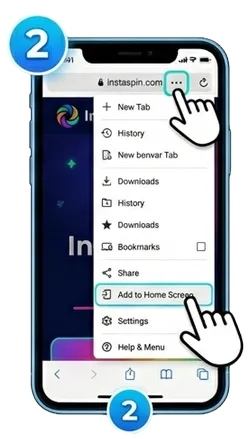
- Create a shortcut
Confirm the action to create a shortcut icon on your device.
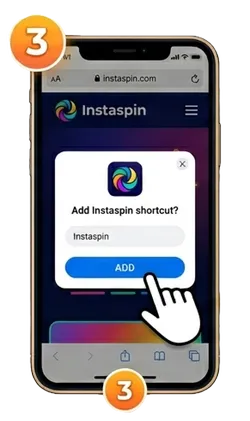
- New icon
Tap the new icon to launch the platform and log in to your account.
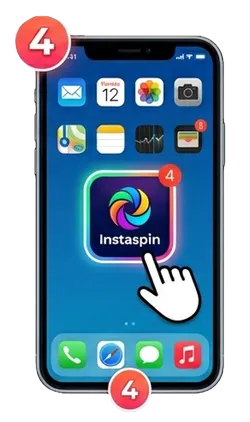
Once completed, you are ready to play. The icon on your home screen will now launch our platform directly, connecting you to your favourite games instantly.
Device System Requirements
Our platform runs on most contemporary mobile devices. You’ll need internet access and a modern browser. Here are the minimum specifications we recommend.
| Requirement | Recommended Specification |
| Operating System | Android 8.0 (Oreo) or newer / iOS 12.0 or newer |
| Memory (RAM) | 2 GB or more |
| Web Browser | Latest version of Chrome, Safari, or Firefox |
| Internet Connection | Stable Wi-Fi, 4G, or 5G connection |
If your device doesn’t meet every recommended specification, you can usually still access our full game suite through your mobile browser.
Installation Options by Platform
There is a difference in the process of installing our app on your device depending on whether you have an Android device or an iOS one. The procedure is relatively simple and will provide you with access to our lobby immediately after opening the app.
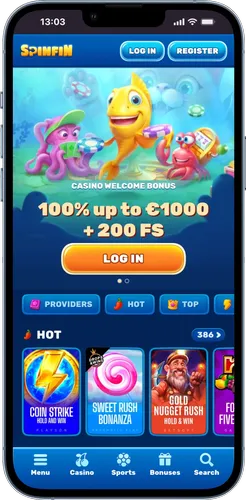
Below, we have provided separate instructions for each operating system. Following these steps will place the Instaspin app icon alongside your other applications, making it easy to find and launch whenever you wish to play.
Android Setup
On Android, you create a home screen shortcut through Google Chrome, installing our progressive web app as a dedicated, full-screen gaming portal that resembles a native app. Chrome handles the whole process in the background, so you don’t need any technical knowledge or extra software to get set up. Once the shortcut is on your device, it opens straight into the Instaspin lobby every time, skipping the browser address bar entirely.
- Launch Chrome on your Android device
- Go to the official Instaspin website
- Tap the three-dot menu icon in the top-right corner
- Select “Add to Home screen” from the dropdown menu
- Name the shortcut and confirm by tapping “Add”
The icon appears on your home screen or app drawer, so you can open the platform directly without typing the web address each time.
iOS Access
On iPhone or iPad, you add the platform to your home screen using Safari, creating a web bookmark that functions like a standalone app for quick access to our full game selection. Apple’s iOS treats this shortcut the same way it treats any installed app, complete with its own icon and full-screen display, even though nothing comes from the App Store. It only takes a few taps in Safari, and you won’t need to repeat the process unless you remove the icon.
- Open Safari on your iOS device
- Navigate to the platform homepage
- Tap the Share icon at the bottom (square with an upward arrow)
- Scroll and tap “Add to Home Screen”
- Edit the icon name and tap “Add” to finish
Your Instaspin app icon appears on your device’s home screen, ready to launch with a single tap.